
1. Ensure the Printer Application is Running
- The Tee On printer application must be open.
- It can be minimized, but cannot be fully closed.
- If it’s closed, printing will not occur.
✅ Fix:
Reopen the printer app and leave it running in the background.
2. Verify Default (Primary) Printer on the Computer
- The receipt printer on the computer you are using must be set as the default (primary) printer in the Tee On printing app.
✅ Fix:
Click the 3 Dots and then click Set as primary
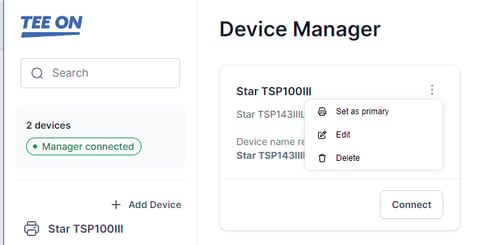
3. Check Kitchen & Bar Printer Settings (Important)
- Kitchen and bar printers must be marked as Primary in the Tee-On app
- This should be configured on ONE main computer only
⚠️ If multiple computers have the same kitchen or bar printer marked as Primary, it can cause:
- Duplicate printing
- Missed prints
- Inconsistent behavior
✅ Fix:
- Choose one main terminal
- Ensure kitchen/bar printers are set as Primary only on that computer
- Remove the Primary setting from all other computers
4. Confirm Printer Connection
- Ensure the printer is:
- Powered on
- Properly connected (USB or network)
- Not showing as offline.
- Make sure you are able to perform a test print from Windows
✅ Fix:
Restart the printer and confirm it appears online in Windows.
5. Restart Printer & Computer (If Needed)
If issues persist:
- Restart the printer
- Restart the computer
- Reopen the printer application
Quick Checklist
- Printer app is open (not closed)
- Correct printer set as default
- Kitchen/bar printers set as Primary on only ONE computer
- Printer is online and connected
If the issue continues after these steps, contact support with:
- Which printer is affected (receipt, kitchen, bar)
- Which computer you are using
- Whether anything recently changed (new setup, network, etc.)